Everything in its place.
Create your own tags. Pick colors and icons. Keep useful notes and make your most-used cards favorites.
YOUR EVERYDAY CARD WALLET
The coffee spot. The grocery run. That little treat.
Keep your loyalty cards, memberships, and vouchers together in one simple app.
Made for iPhone & iPad Free. No account needed.
Android version coming soon.
 A place for your everyday essentials.
SMALL APP. EVERYDAY DIFFERENCE.
Less digging through your bag. More getting on with your day.
Scan a barcode or enter the number manually. Add a name, a color, and a little personality.
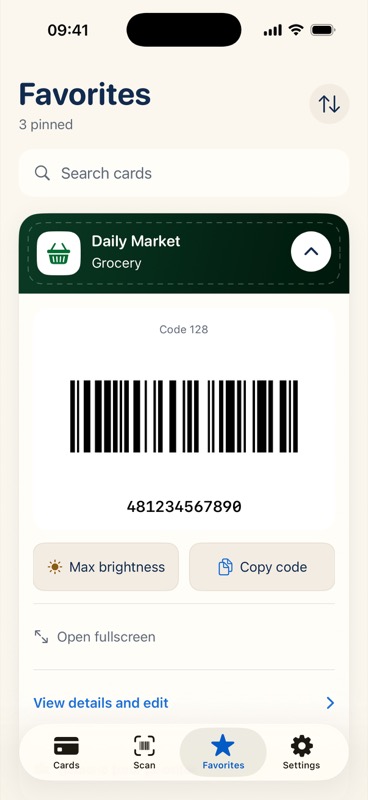
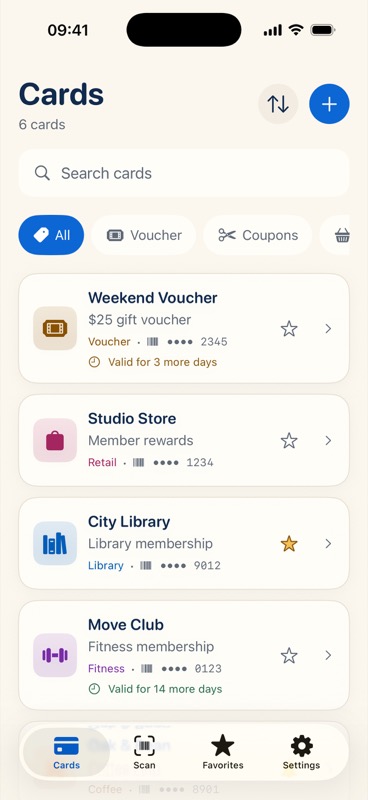
Search, use tags, or keep your regulars in Favorites. Your wallet, arranged your way.
Open a clear, full-screen barcode. Adjust brightness or copy the number when you need to.
THE LITTLE THINGS, TAKEN CARE OF
For loyalty cards, library memberships,
gym passes, coupons, and that gift voucher
you don’t want to forget.
Create your own tags. Pick colors and icons. Keep useful notes and make your most-used cards favorites.
Add an expiration date and choose a local reminder 1, 3, or 7 days ahead. Give that voucher a chance to become something nice.
About remindersExport a backup or import it on another device. CardVault checks your file and keeps existing cards when you import.
Back up your walletExports contain card numbers and notes and are not encrypted. Keep them private. Barcode acceptance depends on the retailer and its equipment.
PRIVATE BY DESIGN
No sign-up. No ads. No tracking SDKs in the app.
Your wallet stays on your device unless you choose to export or share it.
A LITTLE HELP, WHEN YOU NEED IT
Scan, add, and show your first card.
02 / BACKUP & TRANSFERSave a copy or move to a new device.
03 / YOUR DATAManage permissions, exports, and deletion.
No account is needed. Scanning, organizing, and showing your saved cards work offline. Opening this website or emailing support uses an internet connection.
Yes. Export Cards in Settings saves a JSON file. Transfer it privately to your new device and choose Import Cards. There is no automatic cloud sync. Read the backup guide.
QR, Code 128, Code 39, EAN-13, EAN-8, UPC-E, PDF417, and Interleaved 2 of 5. Acceptance depends on the retailer and scanner. CardVault stores barcode-based cards; it does not add them to Apple Wallet or process payments.
MAKE ROOM FOR EVERYDAY
CardVault for iPhone and iPad · iOS 17 or later.
Download CardVault free on the App Store.
Android version coming soon.